BHS Branch Music System Set-Up Instructions
System Description:
The system consists of three primary component:
1. Yamaha StagePas PA System (Speakers, with audio and power cables
inside)
2. KALI Bluetooth Module, with audio and power cable
3. iPad, power cable
Set-Up Details
Yamaha StagePas set-up:
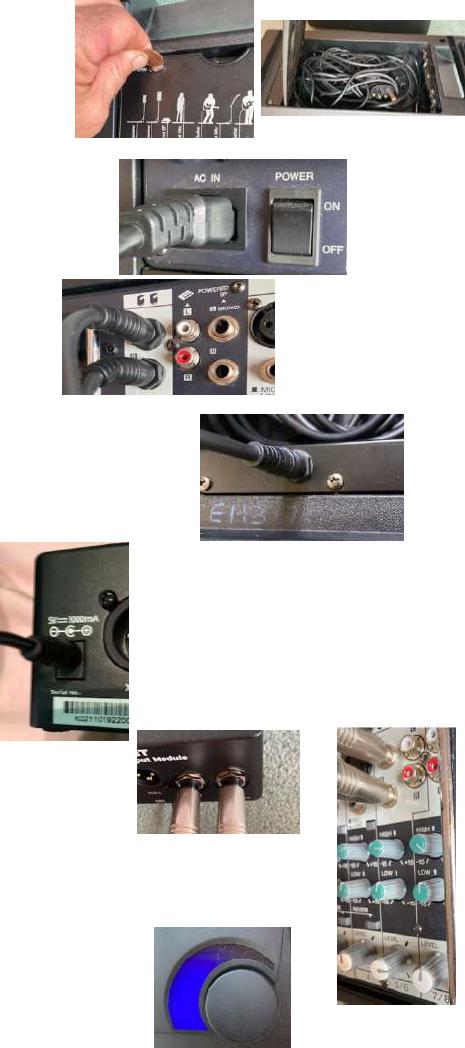
1. Using a penny, open the back panel of the speaker
as shown. Remove speaker and power cables from
the speaker.
2. Insert Power Cable into Mixer section on back of
speaker as shown.
3. Insert Speaker cables into mixer “Speaker”
sockets.
4. Insert other end of speaker cables into sockets on back of each
Speaker.
5. Switch on Power
KALI Bluetooth Module:
1. Insert Power supply to KALI module as shown.
2. Insert Audio cables into back of KALI module as shown.
3. Insert other end of Audio cables into sockets on Channel 5/6 of Mixer
module on PA system
4. Check Power to KALI Module is on, Volume control will
light up blue.

iPAD:
1. Press the “Power” button on the iPad and swipe up
to unlock.
2. Enter Code “123723” to open.
3. Open “Settings”
4. Select “Bluetooth”
5. KALI MVBT should be shown in My Devices, select to connect.
6. If KALI MVBT is not shown, first check that it is powered on and
then press the KALI button and hold for 2 secs. Light around
the button should flash and KALI MVBT should now be
showing, connect as above.
7. Exit Settings and Open Apple Music.
8. If you have provided a Programme ahead of time then a dedicated “Playlist”
should already be set up for your programme (shown at bottom of lefthand
sidebar menu). If not, then you should select “Songs” from the Menu and type
in the Dance Music you want into the Search Field. N.B. You will need to
keep iPad in “Landscape” orientation for the sidebar menu to be
permanently displayed.
9. Selecting the song will automatically start the song.
10. Control of the music can be done using the displayed controls at the bottom of
the screen.
a. Play
b. Pause
c. Jump to Start
d. Jump to End
11. Volume can be controlled by the volume buttons on the edge of
the iPad and by the Volume control knob on the KALI module.